Construction Camera and Internet Outage: Will Your Timelapse Have a Gap?
We pulled the network cable on a running construction camera, then cut the power – and measured what the timelapse looked like afterwards. A practical test with Hikvision and TimelapseRobot.
Part of the series · Long-Term Construction Timelapse GuideConstruction Timelapse for Long-Term Outdoor Projects: The Professional Guide (Months to Years)
Quick answer
No – not if the camera buffers locally and catches up. In our test, a Hikvision IP camera kept capturing to its microSD card while the network was down, uploaded the backlog to TimelapseRobot by itself once the connection returned, and every late image landed at its original capture time. A gap only appears for the time the camera itself has no power, because no images are taken then.
Six months of construction, and then two weeks are missing. That is the fear behind almost every question we get about long-term timelapse – and it is justified. Nobody looks into the camera every day, and when frames are missing at the end, the material is worth a lot less. The question buyers actually have is not "which camera" but: what happens to my timelapse when the internet or the power on site fails?
Manufacturer brochures do not answer that. So in September 2026 we set up a construction camera, pulled the cable, cut the power and measured. Here is what happened.
How the test was set up#
A Hikvision IP camera (DS-2CD2687G2HT-LIZS, firmware V5.7.14 build 231028) takes a JPEG on a fixed schedule and pushes it to TLR-Cloud by FTP. TimelapseRobot archives the images by capture time and renders the video. The camera opens the connection outward, so no port forwarding is needed – the setup works behind a mobile-network connection just as well as on a wired line.
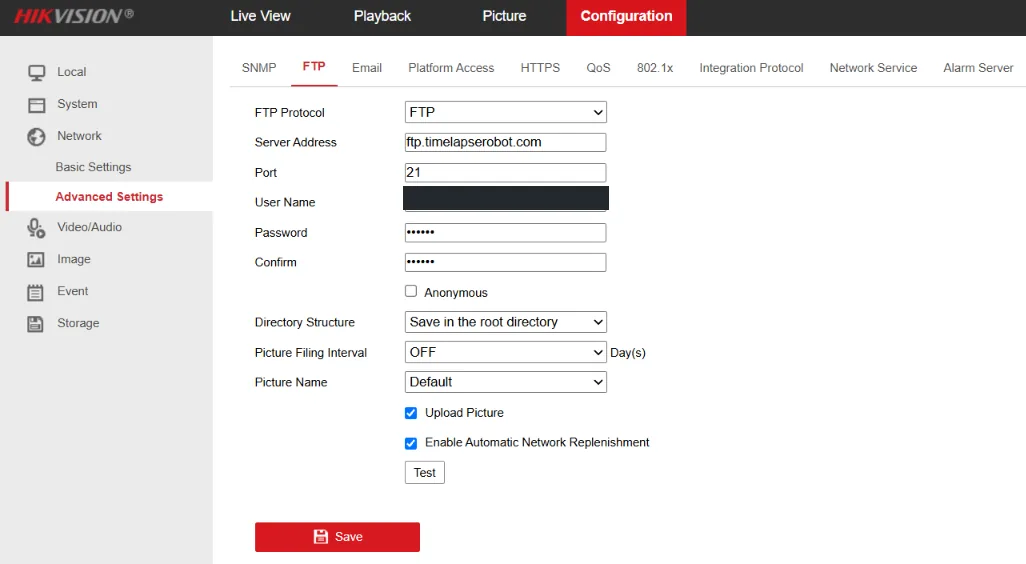
The step-by-step setup is in our Hikvision setup guide. This article is about what happens when things go wrong.
Test 1: network cable pulled, camera keeps running#
The camera stayed on its 12 V supply while we pulled the network cable. Capture interval: one minute.
- The camera kept taking pictures on schedule.
- It saved them to its microSD card.
- TimelapseRobot, naturally, received nothing during the outage.
Then we plugged the cable back in. The camera uploaded the missing images on its own, worked through the backlog without any intervention, and went back to its normal rhythm. No gap.
The decisive detail: where the late images land#
Uploading a backlog is only half the answer. The other half is *where* those images end up in the archive. If a platform files images by the time they arrive, a two-hour outage produces two hours of frames stacked at the wrong moment – the timelapse jumps.
In the test, every late image landed at its original capture time, not at the upload time. The camera writes the capture timestamp into the filename, TimelapseRobot reads it, and the timeline stays chronologically correct without anyone touching it. That is the property that turns "buffering" into "no gap".
One setting makes this work, and it is off by default: Enable Automatic Network Replenishment in the camera's FTP settings. Without it, the buffered images stay on the card forever. It is the single most important checkbox in the whole setup.
Test 2: complete power failure#
On a real site, a power cut does not stop at the router – the camera goes dark as well. So we ran the harder test: LTE gateway switched off, camera kept running for about five minutes without a network, then the camera was switched off too. Afterwards the gateway came back first, then the camera.
Result: the images captured during the gateway outage survived the camera's restart on the microSD card, were uploaded after both devices came back, and appeared at their original capture time. LTE, upload, clock and remote access re-established themselves. Nobody had to drive to the site.
Honest limits: what a camera cannot buffer#
For the minutes the camera itself had no power, there are no images – and there is nothing to catch up. That gap is real, and it is physics, not a product fault. So when you see a gap in a timelapse, the first question is not "did the upload fail" but "did the camera have power". Only the second case produces a gap that no setup can avoid.
What we did not test, and therefore do not claim: outages longer than a few minutes, and a multi-day endurance run at the interval we recommend for production. Five-second and one-minute intervals ran flawlessly at full 8-megapixel resolution; for months-long projects we recommend 5 to 10 minutes, and we suggest checking the first installation after a few days.
How long does the storage on the card last?#
That depends on three numbers: the free space reserved for pictures, the average file size of one image, and the interval.
> Buffer time = free picture storage ÷ (file size per image ÷ interval)
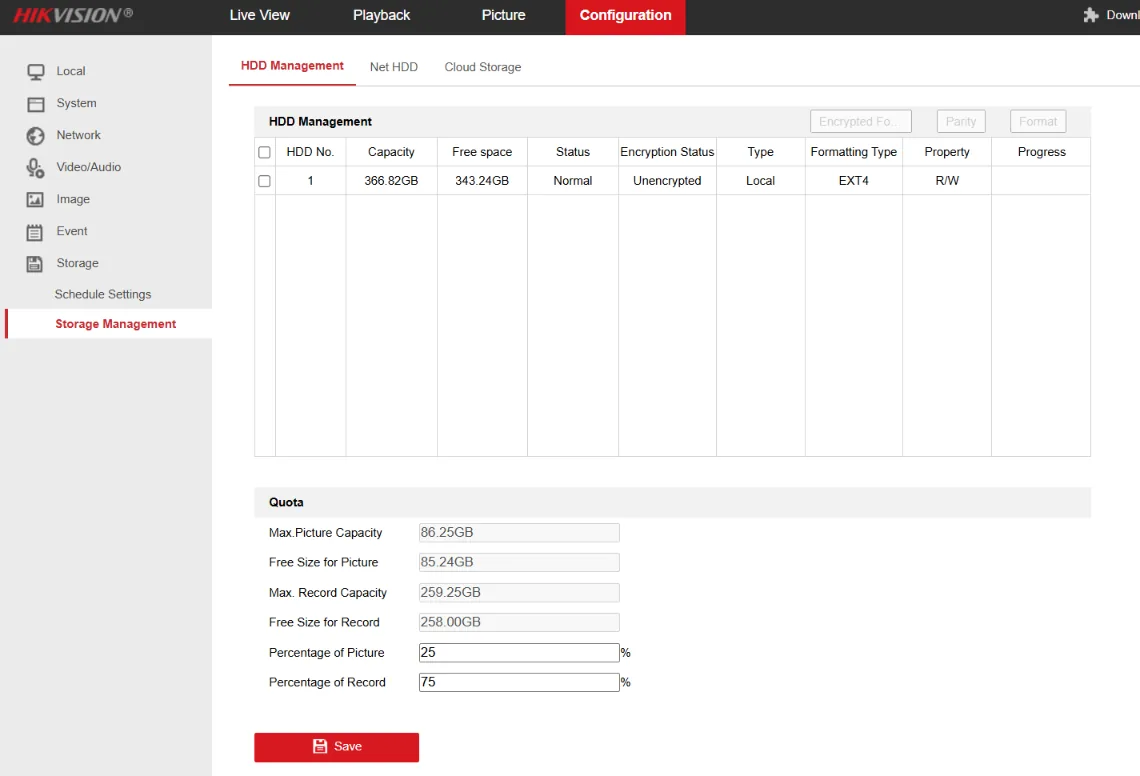
Do not take a file size from a brochure – it varies with the scene, daylight and quality setting; a night frame is far smaller than a sunny, detail-rich site. Measure it: after a day of operation, download a few images from TimelapseRobot and average them. With a 25 % picture quota on a 366 GB card, the test had far more space than a few minutes of outage needed; the full calculation is in the manual.
What this means for your project#
A long-term timelapse fails in two ways: the camera stops taking pictures, or the pictures never leave the site. Continuous power handles the first – see our guide to timelapse camera power supply. Local buffering plus automatic catch-up handles the second, and remote monitoring tells you which of the two happened while it is still fixable – our remote monitoring guide covers that side.
If you already own an FTP-capable IP camera, you can connect it to TLR-Cloud for free and test this yourself. Everything we changed on the camera, including the traps that stop images from arriving, is in the Hikvision setup guide; the complete tested procedure, with the test log, in the 48-page manual. Tested and documented by Thomas Pöcksteiner, Filmspektakel, September 2026.
Frequently asked questions
- Does an internet outage create a gap in a construction timelapse?
- Not if the camera buffers images locally and uploads them afterwards. In our test with a Hikvision IP camera and TimelapseRobot, the camera kept capturing to its microSD card during the outage, uploaded the backlog automatically when the connection returned, and every image landed at its original capture time – the timeline stayed correct without intervention.
- What happens to the timelapse during a power failure?
- For the time the camera has no power, no images are taken, so a real gap remains – that is physics, not a fault. Images captured before the cut and still waiting on the microSD card survived the restart in our test and were uploaded afterwards at their original capture time. LTE, upload, clock and remote access recovered on their own.
- Why do late-uploaded images land at the right time?
- Because the camera writes the capture timestamp into the filename and TimelapseRobot files images by that timestamp, not by upload time. A backlog of two hours therefore fills the two hours it belongs to instead of stacking at the moment of upload.
- Which camera setting is essential for buffering?
- Enable Automatic Network Replenishment in the Hikvision FTP settings. It is off by default; without it, images buffered during an outage stay on the card and are never uploaded.
- How long can the microSD card bridge an outage?
- Buffer time = free picture storage ÷ (file size per image ÷ interval). File size depends on scene, light and quality, so measure it from a day of real images rather than assuming a value. The test covered outages of a few minutes; longer outages were not tested.
Your camera already speaks FTP?
Then you don't need any new hardware. Create a free TLR-Cloud account, paste its FTP details into your camera, and every snapshot lands in an online archive with upload monitoring and one-click rendering.
Connect your camera – free
