Construction Timelapse Problems: How to Avoid Failure in Long-Term Projects
Construction timelapse can look simple at first glance. A camera is installed, an interval is set, and images begin to accumulate over time.
Part of the series · Long-Term Construction Timelapse GuideConstruction Timelapse for Long-Term Outdoor Projects: The Professional Guide (Months to Years)
Quick answer
Most construction timelapse failures are system problems, not camera problems: power interruptions, connectivity failures, storage issues, weather damage, condensation inside enclosures, mounting drift, and incorrect capture intervals. Because footage of finished construction phases can never be recreated, long-term projects need active monitoring and fast failure detection rather than a one-time installation that is assumed to keep working.
Construction timelapse looks simple: install a camera, set an interval, let the images pile up. But a long-term project is judged on whether the image stream stays reliable for months or years while the site changes around it. The serious problems rarely come from the camera itself. They come from the system around it: unstable power, weak connectivity, unmanaged storage, enclosure problems, mounting drift, and above all a lack of monitoring.
Why long-term timelapse projects often fail#
Usually because they are treated as one-time installations rather than systems that need to be run. On a construction site, nothing stays put: temporary power is reassigned, LTE performance changes, contractors move equipment, and new structures change signal paths, shadows and the camera's view.
Small issues also add up. A short network drop, a slight camera shift or a nearly full memory card seem harmless on their own, but across thousands of frames they turn into visible gaps, jumpy framing and missing milestones. By the time someone notices, the material is usually gone.
The most reliable projects are therefore not the ones with the most expensive camera, but the ones designed on the assumption that power, network, weather and site logistics will cause problems. If you are still choosing hardware, read our comparison IP Camera vs GoPro for Construction Timelapse or our guide to the best camera for construction timelapse. For system design and risk management in general, see our guide to construction timelapse for long-term outdoor projects.
The most common problems in construction timelapse#
Power interruptions#
Construction sites rarely have stable power. A temporary outlet gets repurposed, a breaker trips when more equipment is added, a cable is pulled during nearby work, or a distribution box is moved without anyone knowing the camera depends on it.
Capture stops immediately, but the bigger problem is often what happens when the power comes back. A camera may restart without reconnecting to the network, or a modem may stay offline. The system looks powered, yet no images are arriving. Stable power therefore means more than keeping the camera on: the whole chain (camera, modem, router, controller and upload) has to come back on its own. Our guide to timelapse camera power supply for long-term construction projects covers mains power, battery backup, solar limits and recovery planning.
Connectivity failures#
Signal quality changes as steel, scaffolding, containers, cranes and new walls go up. Routers freeze, SIM cards hit their data limits, and another contractor changes the network settings. A connection that was fine at installation can become unreliable months later.
The danger is that this stays invisible. The camera may still be taking pictures, but if they never reach the cloud, the project is effectively blind. Many IP cameras can buffer images on their memory card and upload the backlog once the connection returns. In our network and power outage test, a Hikvision camera did exactly that, and every late image landed at its original capture time. On that camera, the setting that makes this work was off by default. If you are choosing a fixed camera, see our guide to the best IP camera for construction monitoring; our guide on how to turn an IP camera into a construction timelapse system explains how snapshots, FTP upload, timestamps and monitoring fit together.
Storage issues#
Systems that rely only on local memory cards are especially at risk. Cards fill up, overwrite settings delete older files, file systems get corrupted. Teams often assume a large card is enough, only to find that the most important files were overwritten long before anyone retrieved them.
Storage is a process, not a container: images should be transferred regularly, named with clear timestamps, and kept and checked in one central archive. Our guide to camera FTP upload for long-term projects shows how that works in practice. In TLR-Cloud, storage is per camera: 2 GB on the Free plan, 150 GB on the Professional plan and 250 GB on the Business plan. When a camera's storage is full, uploads stop and nothing is deleted; you get an email before that happens.
Weather and environmental damage#
Rain, dust, temperature swings, UV, wind, frost, vibration and the occasional knock wear hardware down over months. Failures usually start slowly: a cable gland loosens, a seal ages in the sun, dust collects on the window, and heat builds up inside the enclosure in summer. Image quality declines first, then the hardware becomes unstable. What matters is not whether a device is nominally weatherproof, but whether the enclosure, mounting, cable protection and maintenance are suited to the full duration of the project. Our guide to outdoor timelapse camera installations shows how to build and protect that setup.
Condensation inside enclosures#
Condensation is one of the most underestimated problems. Even a weatherproof enclosure can collect moisture inside when nights are cool, days are warm or humidity is high. Images look foggy for hours in the morning, droplets reduce sharpness and contrast, and persistent moisture can lead to corrosion. It often goes unnoticed because the outside of the window looks clean.
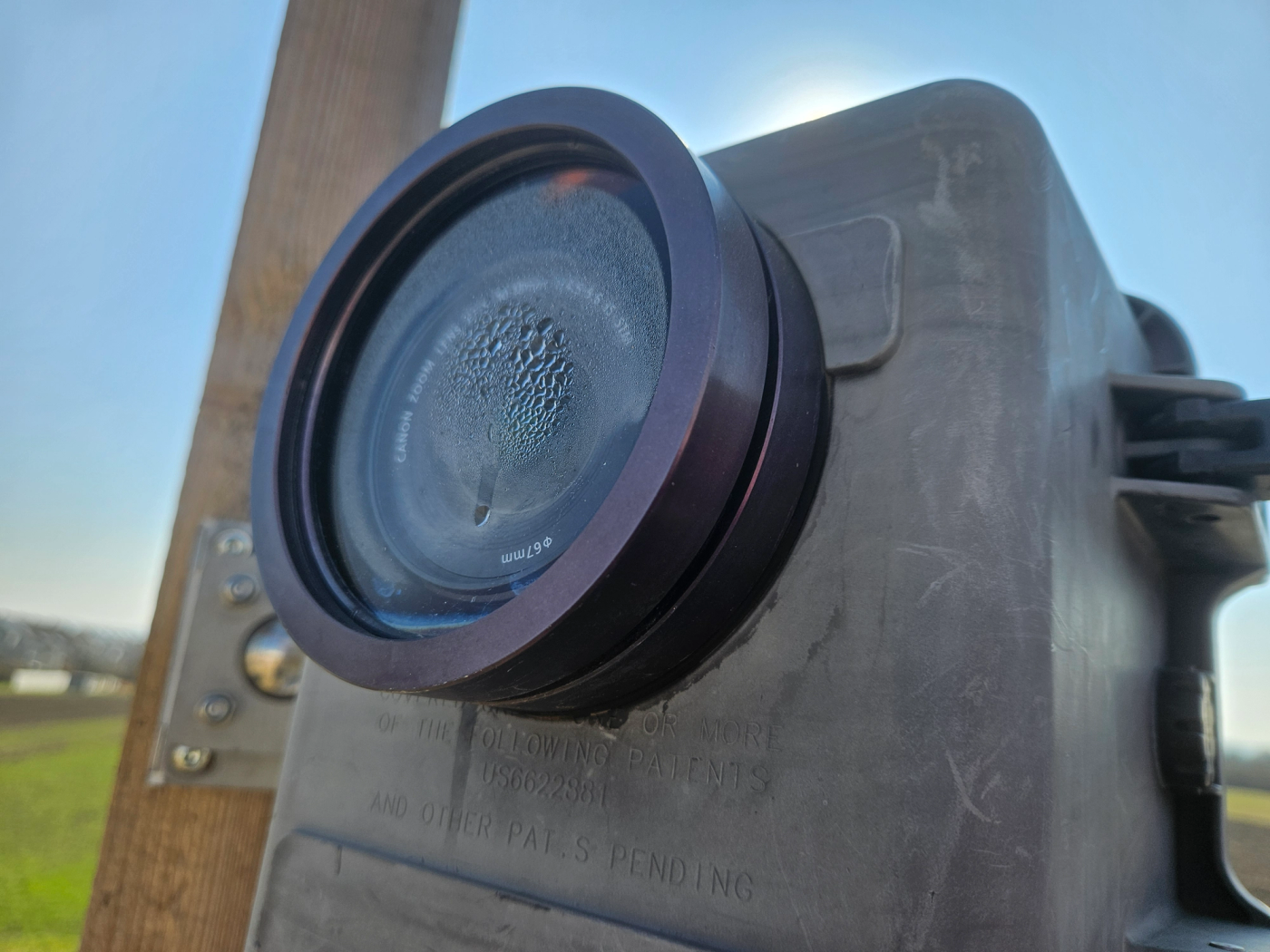
Condensation inside an outdoor timelapse enclosure can reduce image clarity for hours at a time and may remain unnoticed without regular remote image checks.
Camera movement or mounting instability#
A timelapse needs the same framing for the entire project, and even small movements become obvious once thousands of frames are put together. Wind, vibration, flexing structures, accidental contact and scaffold changes all work against that. A bracket that felt solid can loosen after a few storms. In the finished video, the shift shows up as a jump in framing or a tilted horizon, and fixing it in the edit means cropping, which costs resolution and field of view.
Incorrect capture intervals#
An interval that is too short strains power, storage and upload bandwidth; one that is too long leaves important activity out of the video. Day-and-night schedules that were never adjusted produce thousands of dark, useless frames, and wrong working hours, time zones or clock drift distort the timeline. For projects that run for months, we recommend an interval of 5 to 10 minutes as a starting point, adjusted to how fast the site visibly changes.
What happens when these problems go unnoticed#
Problems are expected on long-term outdoor deployments. The real damage happens when nobody notices them. If power fails and no alert goes out, the system can stand still for days. If uploads fail silently, the archive goes dark. If the camera shifts after a storm, the final sequence is compromised before anyone checks the framing.
Missing images mean missing milestones and difficult client conversations. And unlike most technical problems, missed footage cannot be recreated. Once a concrete pour, crane installation or facade phase is over, it is over. Our guide to remote timelapse for long-term construction projects explains how dashboards, upload checks and alerts reduce that risk. For the budget side of reliability and downtime, see Construction Timelapse Costs: What Companies Should Really Budget For.
Why long-term projects require monitoring, not just setup#
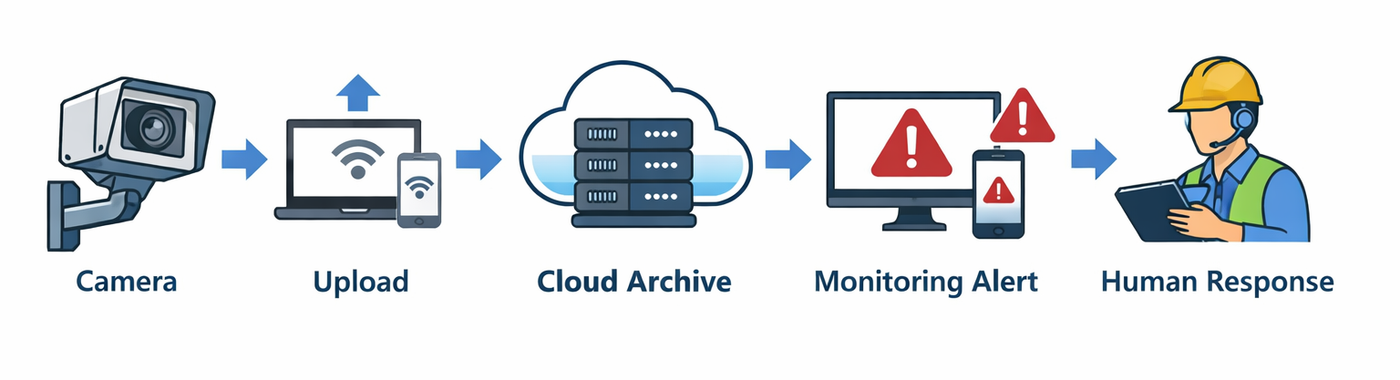
Setup is only the starting point. After installation, the real question is whether the system keeps working every day, every week and every month. Monitoring shortens the time between a failure and the response: if new images stop arriving, someone should know quickly, and if the latest image looks foggy or the framing has changed, that should be visible before it goes on for weeks.
Without monitoring, the first sign of trouble comes far too late: a client asks for recent footage, an editor opens the archive, or a site visit shows that the camera has not uploaded anything for two weeks.
How TLR-Cloud reports a failure: the daily upload check#
TLR-Cloud checks each camera once a day, at a time you set yourself, and sends you an email if photos are missing. It is not a live alarm, but a stopped upload shows up at the next daily check instead of at the next site visit. The upload check is part of the Free plan: free for every camera, with 2 GB of storage per camera.
Two more features help with the quieter problems:
- Image of the day: a daily photo by email, so you can spot fogging, a dirty window or a shifted frame without opening the app.
- Alerts in the web app: an overview of which camera or project needs attention.
With the Professional plan, notifications and the image of the day can go to several email addresses, for example to the site manager as well. If you use a smartphone as a camera, you also get an email when it loses its connection for longer than a grace period you set, and a warning when its battery runs low.
The check tells you that something is wrong; it cannot fix the cause. If the camera had no power, there are no images to recover. If it only lost the network, a camera that buffers to its memory card can upload the backlog afterwards.
How professional systems prevent these issues#
Professional systems look at the whole workflow, not just image capture: stable power, protected outdoor hardware, a reliable network, structured uploads, a central archive and an automatic view of the current system status. For an overview of how capture, upload, storage, monitoring and rendering work together, see our guide to the construction monitoring camera timelapse workflow.
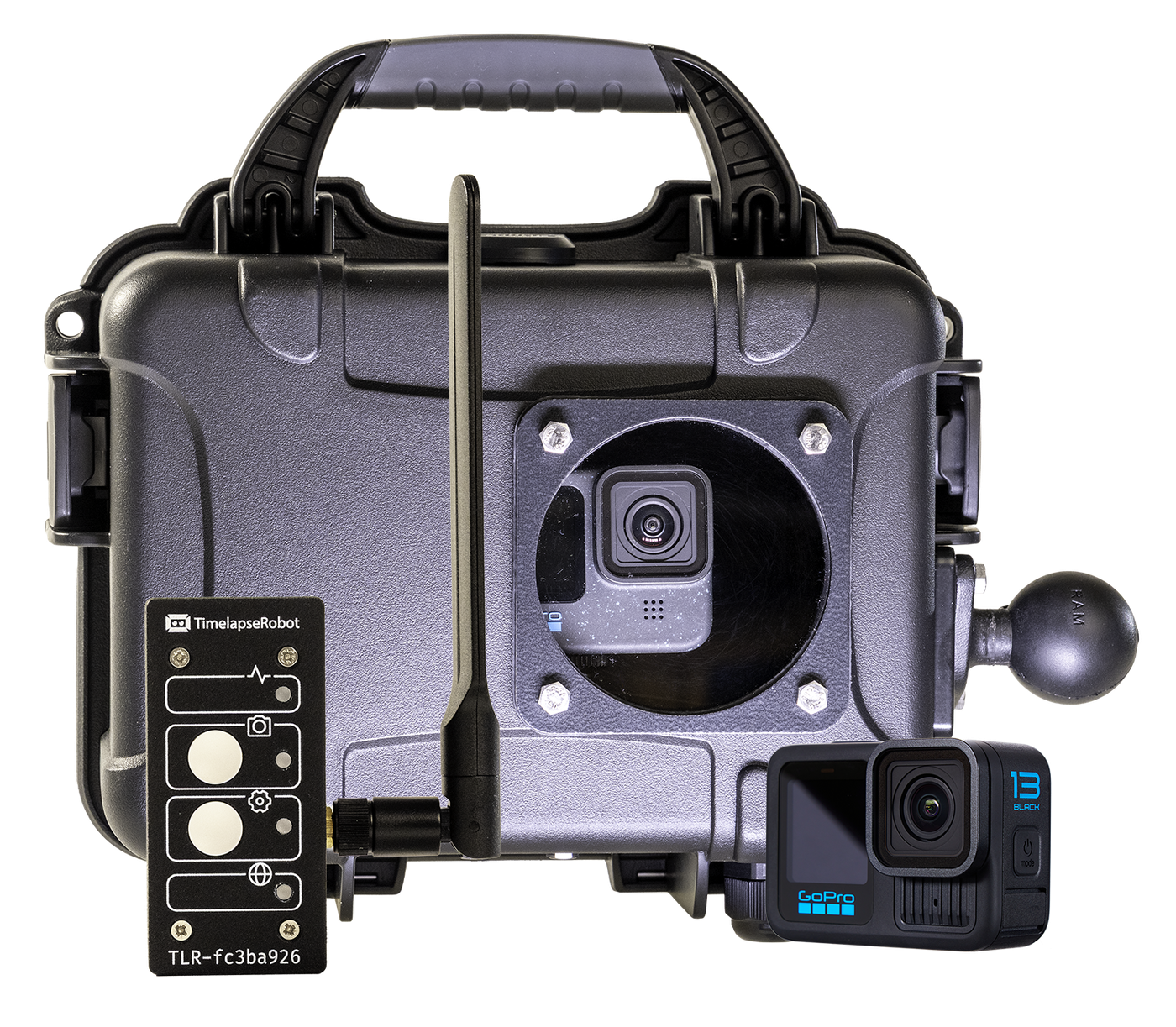
Our complete construction timelapse setup is built on this principle: a GoPro in a weatherproof case, with the TLR-Bridge providing continuous power and 4G upload to TLR-Cloud.
Explore the Construction Timelapse System
The idea is simple: assume that something will go wrong, and design the system so that you notice quickly and can recover.
Best practices to ensure reliable multi-month operation#
- Assess the site first: power, likely construction changes, signal quality, maintenance access, weather exposure and safe mounting points.
- Treat power as critical infrastructure: protect it from accidental interruption and test whether the whole chain comes back after a restart instead of assuming it will.
- Verify connectivity under real conditions, not just during installation, and keep an eye on it for the entire project.
- Plan storage as an archive workflow: regular transfers, clear timestamps, one central location. A local card is a backup, not the only copy.
- Plan outdoor protection as carefully as image quality: enclosure, seals, cable entries and the window, including condensation. For GoPro-based setups, our GoPro construction timelapse setup guide covers power, weather protection and monitoring in detail.
- Mount for long-term stability and check the alignment again after storms or nearby structural work.
- Choose the interval for the project, not the default setting: consistent, useful images matter more than sheer volume.
- Assign someone to monitor the system and act on alerts. Many problems persist only because nobody feels responsible.
Conclusion#
The biggest problems in long-term construction timelapse are rarely camera problems; they are system problems. Power cuts, connectivity failures, full storage, weather, condensation, mounting drift and wrong intervals can affect any long project. What separates successful projects from failed ones is whether the system can withstand these problems, report them quickly and recover.
Already have an IP camera with FTP upload? You can connect it to TLR-Cloud for free, including the daily upload check, the image of the day and 2 GB of storage per camera. No camera yet? Take a look at our complete set with a GoPro, the TLR-Bridge and a weatherproof case: Explore the Construction Timelapse System. To see everything else the software does, from rendering to sharing pages (called Landing Page in the app), visit TLR-Cloud.
Frequently asked questions
- What are the most common reasons a construction timelapse fails?
- Power interruptions, connectivity failures, storage problems from unmanaged memory cards, weather damage, condensation inside the enclosure, camera movement from unstable mounting, and poorly planned capture intervals. These are system issues rather than camera defects, which is why projects treated as one-time installations fail more often than those that are actively monitored.
- How can I tell if my timelapse camera has stopped uploading images?
- Often not from the site itself: the camera may still be capturing while uploads have been failing for days because of a frozen router, an exhausted SIM data allowance or changed network settings. You need a check that new images are actually arriving. TLR-Cloud does this once a day at a time you choose and emails you if photos are missing.
- Why do my construction camera images look foggy in the morning?
- Usually because of condensation inside the enclosure. Cool nights and warm days create moisture on the inside of the window, so images look foggy or washed out for hours. It often goes unnoticed because the outside of the window looks clean; persistent moisture can also cause corrosion.
- Can missing timelapse footage be recovered or recreated later?
- Images a camera captured but could not upload can often be uploaded later, if the camera buffers them locally. Images that were never captured, for example during a power cut, cannot be recreated. Once a concrete pour, crane installation or facade phase is over, it is over.
- Is a large memory card enough to protect a long-term image archive?
- No. Cards fill up, overwrite settings delete older files and file systems get corrupted, often long before anyone retrieves the images. Transfer images regularly to a central archive with clear timestamps and treat the local card as a backup only.
- Does a timelapse system recover on its own after a power outage?
- Not always. A camera may restart without reconnecting to the network, or a modem may stay offline, so the system looks powered while no images arrive. Test whether the whole chain, from camera to modem to upload, comes back after a restart instead of assuming it will.
Already have an IP camera?
Connect it to TLR-Cloud for free: daily upload check, image of the day, gallery and 2 GB of storage per camera.
Connect your camera for free

