CamDo UpBlink vs Timelapserobot TLR-Bridge: which GoPro timelapse controller fits your project?
CamDo UpBlink against the Timelapserobot TLR-Bridge and Complete Setup: power, LTE, where your images go, the CloudX subscription, and the real cost of a connected GoPro timelapse over a year. Honest about when UpBlink is the better buy.
Written by Timelapserobot, maker of one of the systems compared.
Quick answer
Buy the CamDo UpBlink if the camera position has no mains power: with CamDo's DryX or SolarX enclosure a GoPro runs for weeks or months on battery and solar, and the controller also supports older GoPros and the Sony RX0. Buy the Timelapserobot TLR-Bridge if the site has power and you want LTE built in and images online without a mandatory subscription, for €499 with your own GoPro or €999 as a complete kit. The decisive difference is the cloud: UpBlink only uploads to CamDo's CloudX, which costs from $69 per unit per month; the TLR-Bridge uploads to TLR Cloud on a free plan.
This comparison is written by Timelapserobot, the maker of the TLR-Bridge. We have not run an UpBlink on our own sites; every CamDo fact below comes from CamDo's product, pricing and support pages and a European reseller listing, last checked on 4 September 2026 and linked at the end. Where UpBlink is the better choice, we say so.
Both products solve the same problem: a GoPro is a great timelapse camera but has no scheduler, no long-term power management and no way to get its images off the site. Both controllers plug into the GoPro's USB-C port, wake it for each shot, and push the images to a cloud platform. The differences are in power, connectivity, the cloud, and the price of the whole system.
At a glance#
| Timelapserobot TLR-Bridge | Timelapserobot Complete Setup | CamDo UpBlink | |
|---|---|---|---|
| Price (Sept 2026) | €499 | €999 | $849 (~€654 at a European reseller) |
| What is included | Controller with LTE and Wi‑Fi | Controller, GoPro HERO 13, weatherproof housing, power supply | Controller and USB-C cable only |
| Supported cameras | GoPro HERO 12, HERO 13 | GoPro HERO 13 included | GoPro HERO10/11/12, HERO13 in beta; HERO5–8 trigger only; Sony RX0 / RX0 II |
| Internet connection | Built-in 4G/LTE (SIM and antenna inside) or Wi‑Fi | Built-in 4G/LTE or Wi‑Fi | Wi‑Fi; USB Ethernet or optional 4G USB modem ($80, SIM separate) |
| Where the images live | TLR Cloud, optional SSD backup, optional forwarding to your own FTP server | Same | CamDo CloudX only |
| Subscription | Optional: free plan; €29 or €49 per camera/month | Same | CloudX Pro required for upload: $69, $99 or $159 per unit/month |
| Power | Mains, continuous | Mains (interior plus 5 m exterior cable) | External USB battery, DryX enclosure with 48 Wh battery, or SolarX with 9 W solar panel |
| Scheduling | Interval, weekdays, 24 h or time window | Same | Up to 4 schedules; photo, day, night, burst or video; date scheduling |
| Alert when capture stops | Yes, upload monitoring on the free plan | Same | CloudX status emails (100/month on Pro, unlimited on Plus) |
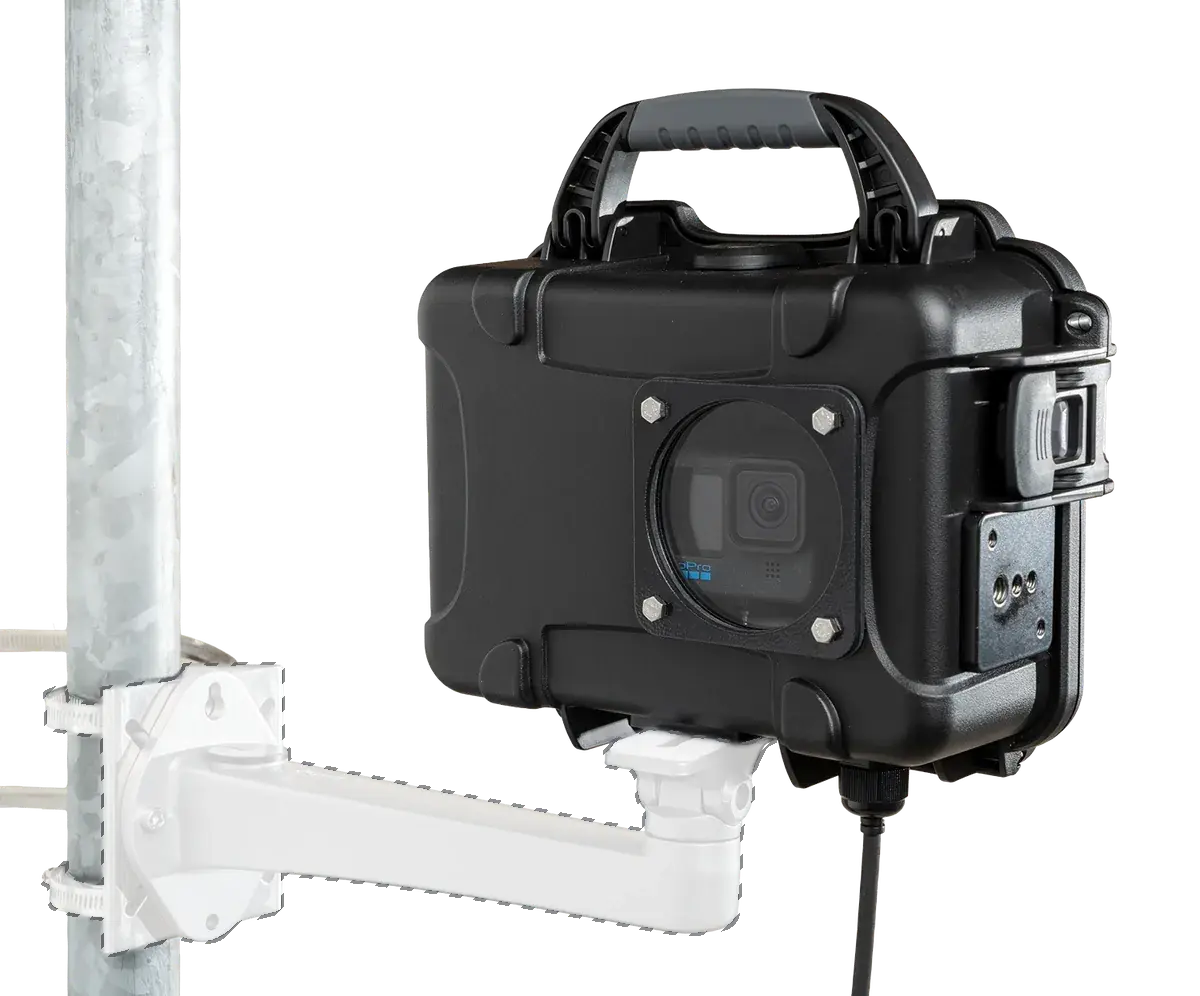
| Weatherproof housing | Sold separately (€399) | Included | DryX $982 (with battery) or SolarX $1,592 |
| Company | Vienna, Austria; ships worldwide | Same | Vancouver, Canada; warehouse in the US |
Where UpBlink is the better choice#
No mains power at the camera. This is CamDo's home turf and our weak spot. The UpBlink powers the GoPro down between shots, and paired with the DryX enclosure and its 48 Wh battery or the SolarX with a 9 W panel it runs unattended for long stretches. The TLR-Bridge needs continuous mains power and we do not sell a battery or solar option. If you cannot run a cable to the camera, UpBlink wins before anything else matters.
Older GoPros or a Sony RX0. UpBlink supports HERO10 to HERO13 for cloud upload, HERO5 to HERO8 as a plain trigger, and the Sony RX0 and RX0 II. The TLR-Bridge works with HERO 12 and HERO 13 only.
Very detailed schedules. UpBlink lets you stack up to four separate programs with photo, burst, video and night modes and start or end dates. The TLR-Bridge covers the construction case (interval, weekdays, time window) without that depth.
You are in North America and already use CloudX. CamDo's ecosystem, its DataLens cameras and its 4G modem are built around North American and Australian networks. If your team is already on CloudX, adding another UpBlink is the path of least resistance.
Where Timelapserobot is the better choice#
The site has power. Then UpBlink's battery and solar engineering is capability you pay for but do not use. The TLR-Bridge costs €499 against $849, and it already contains the LTE modem and SIM that UpBlink needs an extra $80 modem and your own SIM for.
You do not want a mandatory subscription. This is the biggest practical difference. An UpBlink can only upload to CloudX, and CloudX requires a paid plan per unit, from $69 a month. TLR Cloud has a free plan that includes upload, archive, upload alerts and one rendered film a month; the €29 and €49 plans add storage, renders, AI frame selection and privacy blurring but are optional. On the Bridge you can also forward every image to your own FTP server.
LTE without extra parts. The TLR-Bridge has the 4G modem and antenna inside the housing and works on a day-one site with no Wi‑Fi. UpBlink connects to Wi‑Fi out of the box; for mobile data you add the $80 USB modem, which CamDo sells for North America and Australia, and a SIM.
You want a complete kit. Our €999 Complete Setup includes the GoPro HERO 13, the weatherproof housing and the power supply, ready to plug in. The equivalent CamDo build is assembled from UpBlink, an enclosure, a modem and a camera you buy separately, at roughly three times the price before the subscription.
Buying in Europe. We ship from Austria with EU pricing in euros and country-based shipping from €9.90, and consumers in the EU keep their statutory 14-day right of withdrawal. CamDo ships from the US in dollars; a European reseller lists the controller at about €654 including VAT, and imports carry duty. CamDo accepts unused returns for 15 days with a 20 % restocking fee on opened products.
Cost over 12 months#
CamDo prices are in US dollars as published on cam-do.com; euro figures assume roughly 1 $ ≈ 0.90 € and exclude import duty. Both systems still need a GoPro; only the Complete Setup includes one.
| TLR-Bridge with your own GoPro | TLR Complete Setup | UpBlink + DryX + modem | UpBlink + SolarX + modem | |
|---|---|---|---|---|
| Controller | €499 | included | $849 | $849 |
| Enclosure and power | your own housing, or €399 | included | $982 (DryX with 48 Wh battery) | $1,592 (SolarX, 9 W panel, battery) |
| Mobile data modem | included | included | $80 plus SIM | $80 plus SIM |
| Camera | your GoPro HERO 12/13 | GoPro HERO 13 included | your GoPro | your GoPro |
| Cloud, 12 months | €0 (Free) / €348 (Pro) / €588 (Business) | same | $759 (Pro, annual) to $1,749 (Max) | same |
| Total, 12 months | €499 to €1,486 (camera not included) | €999 to €1,587 (camera included) | $2,670 ≈ €2,400 (camera not included) | $3,280 ≈ €2,950 (camera not included) |
The gap is the subscription. Hardware for hardware, UpBlink with a DryX costs about twice a TLR-Bridge with our housing; add a year of CloudX Pro and the CamDo system costs three to four times as much for a site that has power. Where there is no power, that comparison is meaningless, because only one of the two works there.
Can I use an UpBlink with TLR Cloud, or a TLR-Bridge with CloudX?#
No, in both directions. UpBlink uploads to CloudX only; CamDo lists FTP and white-label options as "contact sales" rather than as a standard feature. The TLR-Bridge uploads to TLR Cloud and can additionally forward images to your own FTP server, but not to CloudX. If you already own an FTP-capable IP camera from Reolink, Hikvision, Dahua or Axis, it connects to TLR Cloud for free.
Verdict by scenario#
- No mains power, long project, budget for a subscription: CamDo UpBlink with SolarX.
- Site has power, you own a HERO 12 or 13 and want no fees: Timelapserobot TLR-Bridge.
- Site has power and you want everything in one box: Timelapserobot Complete Setup.
- North American team already on CloudX: stay with UpBlink.
- No power, no subscription wanted: neither. Look at Brinno in our Brinno vs Timelapserobot comparison.
For the whole field, including Enlaps Tikee and managed services, see our roundup of the best construction time lapse cameras.
Sources#
- CamDo UpBlink product page (compatibility, connectivity, scheduling, $849 price, returns policy)
- CamDo CloudX subscription plans ($69 / $99 / $159 per unit per month, one subscription per registered unit)
- CamDo 4G modem for UpBlink ($80, SIM separate, North America and Australia)
- CamDo DryX enclosure and SolarX solar enclosure
- European reseller listing for UpBlink at Nefal (€550 net, €654.50 gross)
- Timelapserobot TLR-Bridge, Complete Setup and pricing
Frequently asked questions
- Does the CamDo UpBlink work without a subscription?
- It can trigger the GoPro on a schedule without one, but uploading images requires a CloudX Pro subscription from $69 per unit per month. One month of CloudX Plus is included with the purchase.
- Does the Timelapserobot TLR-Bridge need a subscription?
- No. Scheduling, optional SSD backup and upload to the free TLR Cloud plan work without a paid plan. The €29 and €49 plans add storage, more renders, AI frame selection and privacy blurring.
- Which GoPro models does each controller support?
- UpBlink uploads from HERO10, HERO11, HERO12 and HERO13 (beta) and can trigger HERO5 to HERO8; it also supports the Sony RX0 and RX0 II. The TLR-Bridge supports GoPro HERO 12 and HERO 13.
- Can the Timelapserobot system run on battery or solar power?
- No. The TLR-Bridge and the Complete Setup need continuous mains power. For an off-grid position, UpBlink with CamDo's SolarX enclosure is the right choice.
- Does UpBlink have LTE built in?
- No. It connects over Wi‑Fi; for mobile data you add CamDo's $80 USB modem and your own SIM. The TLR-Bridge has the LTE modem, SIM and antenna built in.
Site has power and you want your GoPro online without a monthly fee?
LTE built in, flexible schedules, optional SSD backup, free cloud plan.
See the TLR-Bridge GoPro Timelapse Controller